Privacy

How to Store Data Securely on a USB Flash Drive

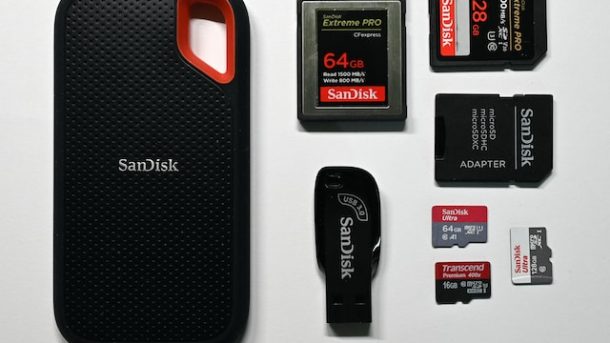
Photo by Lc on Unsplash

It is strongly advised that you avoid storing confidential information on a USB flash drive and choose more secure storage devices to ensure the safety of your data. The compact size of USB flash drives makes them convenient to carry but also increases the chances of losing or stealing them. This vulnerability poses a severe threat of data loss, leaks, and breaches, which can result in significant financial loss and damage to the reputation of organizations.

Using a flash drive, follow these 7 tips to secure your data.

  1. Buy an Encrypted USB.

Encryption secures sensitive data by making it accessible only to those with a decryption key. When purchasing a flash drive, opt for a military-grade one with 256-bit AES hardware encryption, the most robust algorithm.

Other features to look for in an encrypted USB flash drive include:

  • Tamper-proof protection
  • Anti-virus scanning
  • Brute-force protection
  • Password protection
  • TAA Compliance
  • Remote management capabilities
  • FIPS 140-2 Certification (Level 3)
  • Compliance with industry security standards, such as HIPAA, SOX, and GLBA.

2. Use USB Encryption Software.

Microsoft Windows users can use BitLocker to encrypt their flash drives instead of buying an encrypted flashdrive. Note that encryption hardware provides better security than software.

Microsoft’s instructions for enabling BitLocker are available below:

View instructions for enabling BitLocker in Windows 10
View instructions for enabling BitLocker in Windows 11‍

3. Have a Backup

You may only recover the stored data if your flash drive is recovered, stolen, or damaged. Even if a lost or stolen flash drive is returned, you shouldn’t use it again as it could potentially have ransomware or another type of malware installed. The best assurance of recovering the data on your flash drive is to have a backup of all files saved in another storage location, such as cloud storage.

4. Delete Data After Use.

After you have saved, edited, and transferred your data from a USB stick, it is recommended that you delete it immediately. You should then remove the flash drive from the USB port and store it securely to prevent any possibility of losing it or having it stolen.

5. Install Anti-Virus Protection

With different types of malware emerging daily, keeping your software up-to-date is crucial. Use antivirus software that offers malware protection across all endpoints, including hard drives, USB devices, and SD cards – one can infect all.

6. Keep Software Up to Date

Zero-day exploits take advantage of unpatched software vulnerabilities – a common attack vector that can have devastating consequences. Cybercriminals can easily access, edit, and steal data from vulnerable systems and devices, including USB storage. Installing software updates as soon as possible prevents cybercriminals from taking advantage of these vulnerabilities. Most operating systems, including Microsoft Windows, Mac OS / Apple iOS, and Linux, offer auto-updates to ensure you remain protected.

7. Use Alternative Storage Methods

Flash drives, there are better answers than not to take your data security seriously. Even the most secure USB drives differ from modern data storage methods, like cloud storage. Cloud services offer many innovative security features, such as the Secure Access Service Edge (SASE). SASE is a cloud security model that leverages firewalls, cloud access service brokers (CASBs), secure web gateways (SWG), and zero-trust network access (ZTNA). Cloud security mechanisms include Cloud Security Posture Management and Cloud Infrastructure Entitlement Management (CIEM).

Despite their strong security capabilities, like all third-party vendors, cloud services carry third-party risks and other risks specific to their functionality. Organizations and individuals must conduct due diligence to ensure their cloud providers are following appropriate data security requirements.
No Social Media, No Cellular Data

Photo by camilo jimenez on Unsplash

As we confront the onset of 2020 with the force of a charging bull, it feels apt to formally document my New Year’s Resolutions for this year.

I’ve distilled my aspirations into two, but they carry a significant weight.

Truthfully, these transformative changes have been simmering in my thoughts for several months, if not years. Both are centered around refining how I interact with computers, enhancing my overall quality of life and happiness.

The essence of computing should enrich our lives, improve them, and elevate our happiness. If any aspect of the technological landscape—hardware, software, services, or features—contributes to discomfort, perhaps it’s time to contemplate letting it go.

My inaugural Resolution for 2020 is a seemingly simple yet essential shift that I’ve passionately advocated for throughout my journey, as followers of my timeline may already be aware.

No More Social Media.

Photo by Alexander Shatov on Unsplash

Indeed, I am resolving to eliminate social media from my life entirely. This encompasses platforms such as X, Facebook, LinkedIn, Reddit, YouTube, and their equivalents. No more engaging in posting, reading, liking, commenting, or re-sharing content on any of these services or their analogs. While I’ll maintain the accounts to prevent impersonation, they will be closed off from active use.

I am convinced that the concept of Social Media is inherently flawed. This realization has been percolating in my mind for quite some time. Regrettably, I found myself succumbing to the addictive nature of these platforms, only to conclude that they do not contribute a net positive impact on my life, both personally and publicly.

Tried to quit social media in 2019.  I failed.

In 2020, I’m embarking on another attempt at redefining my online presence. While I bid farewell to Social Media, I must note that my departure from these platforms doesn’t equate to a complete disconnection from the digital realm (yes, I still hyphenate that word). I will maintain accessibility through email, both the traditional Internet version.

Anticipating a spectrum of reactions, some will assert, “Impossible!” while others will confidently declare, “So easy! I already do that!” There might even be a handful lurking in the corners of the globe, crafting random mean or snarky remarks on X. The beauty of it all? I won’t be privy to any of it. So, feel free to snark away — it’s all good from my perspective.

Honestly, I’m guessing I won’t be the only one with such a resolution for 2020… here’s hoping we all succeed.

No More Cellular Data Service.

As my second New Year’s Resolution, I’m taking a decisive step by discontinuing cellular data. This means bidding farewell to smartphones equipped with ever-present Internet connections, be it an iPhone with 4G, an Android phone with 5G, or even a Linux-oriented phone boasting a speculative 17G connection (or whatever G designation they decide on by the close of 2020).

I find modern smartphones’ “always connected” nature to be stress-inducing and negatively impacting my quality of life.  While there are certainly some benefits… the negative aspects of being constantly connected are simply too strong. I’ll still let myself have a phone.  But my phone… will just be a phone. When I’m walking around town, I have no Internet connection.  I’ll be offline without sitting at my computer (“In the real world”).

Maybe I’ll have two devices- one PDA (I’m bringing that acronym back) and one phone.  Perhaps I’ll settle on a single PDA-Phone (just without any 2G/3G/4G/5G/whatever connection).  I haven’t decided on that part yet.

Thus far, things have gone relatively smoothly.  Over the coming days, I’ll keep my smartphone turned off and see if any problems crop up.  I’m sure there will be some inconveniences — we’ve all gotten so used to smartphones with always-on data connections — but I am anticipating, based on how it has gone so far, an overall positive experience leading up to January 1st.

Does anyone expect to be on their deathbeds and have their final thought be, “Darn, wish I would have liked a few more things on X?”  Or, “I wish I would have spent more time surfing the web on my cell phone while at dinner with my family?”

Will these changes positively impact my life and overall happiness (which is already pretty high, but why not shoot for even better)? Will any inconveniences crop up that are insurmountable? Will I experience gains (or losses) in productivity?